我造了一个日志轮子:easylog
某一天需要做一个期末课题,要做的东西有点大,靠 print 太折磨了,就想用日志记录。试了试 Python 的 logging 库,配置与个性化问题有点劝退,就想着自己写一个简单的小模块:只要能同时输出到控制台和文件,并且能显示是从哪个函数调用的就行。
代码结构
easylog.py 的核心部分:
python
import os
import inspect
import datetime

LOG_LEVELS = {'debug', 'info', 'warning', 'error', 'critical'}

LogPath = "log.log"
LogPrintBool = True
LogPrintLevel = ['info']
LogRecordLevel = ['info']
LogTimeFormat = '%Y-%m-%d %H:%M:%S.%f'

def setLogPath(log_path="log.log", log_print_bool=True,
               log_print_level='info', log_record_level='info',
               log_time_format='%Y-%m-%d %H:%M:%S.%f'):
    # 具体设置逻辑见完整代码
    pass

def log(log_level, message):
    # 获取调用者信息(跳过两层)
    caller_frame = inspect.currentframe().f_back.f_back
    caller_name = caller_frame.f_code.co_name
    if caller_name == '<module>':
        if caller_frame.f_globals['__name__'] == '__main__':
            caller_name = 'main'
        else:
            caller_file = os.path.basename(caller_frame.f_globals['__file__'])
            caller_name = f'global ({caller_file})'
    # 格式化并写入控制台+文件
    ...

def info(message): ...
def debug(message): ...
def warning(message): ...
def error(message): ...
def critical(message): ...
使用方式:直接调用 easylog.info("开始运行"),不用实例化。
使用示例
在一个数据分析脚本中,配置如下:
python
def logconfig(log_path):
    easylog.setLogPath(
        log_path = log_path,
        log_print_bool = True,
        log_print_level = "INFO, ERROR",
        log_record_level = "INFO, DEBUG, ERROR",
        log_time_format = "%Y-%m-%d %H:%M:%S"
    )

if __name__ == '__main__':
    logconfig('./log.log')
    easylog.info("开始运行")
    if not ask_user(f"需分析的数据文件路径设置为:{file_path} , 是否正确 (Y/N): "):
        easylog.debug("文件路径不对")
        exit()
    if ask_user(f"是否打印数据文件(Y/N): "):
        easylog.info("打印数据文件")
        print_data_table(file_path)
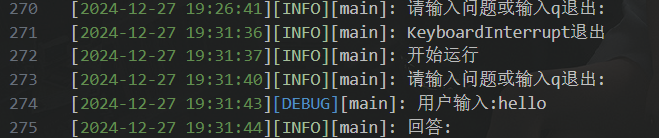
输出日志示例(另一个聊天程序的实际输出):
log
[2024-12-28 21:58:08][DEBUG][main]: 用户输入:hello
[2024-12-28 21:58:11][INFO][main]: 回答: Hello! How can I assist you today?
[2024-12-28 21:58:25][DEBUG][main]: 用户输入:你可以说中文吗
[2024-12-28 21:58:27][INFO][main]: 回答: 当然可以...
个性化方面,只是本人喜欢用 [] 分块的风格之类的,然后是 VSCode 会自动将 [INFO]、[DEBUG] 等关键词高亮,阅读日志比较方便。
遇到的问题
在实现调用者函数名时,最初只用了 inspect.currentframe().f_back,结果拿到的总是 info、debug 这些封装函数的名字,而不是真正调用日志的业务函数名。
原因:info() 调用 log(),f_back 只往回跳了一层,指向 info 函数自身。需要再跳一层到调用 info() 的地方。
解决方案:使用 f_back.f_back,并处理全局作用域的情况(<module> 转为 main 或文件名)。
后续
这个模块实际只在两三个项目中使用过,后来没有再维护。对于小规模脚本或个人项目,它能满足基本需求;如果项目更大或需要生产级特性,还是建议使用标准库 logging。
完整代码
python
import os
import inspect
import datetime


# 定义日志等级
LOG_LEVELS = {'debug', 'info', 'warning', 'error', 'critical'}

# 初始化全局变量(默认值)
LogPath = "log.log"
LogPrintBool = True
LogPrintLevel = ['info']
LogRecordLevel = ['info']
LogTimeFormat = '%Y-%m-%d %H:%M:%S.%f'

# 设置日志路径,是否打印日志,日志打印等级,日志记录等级
def setLogPath(log_path = "log.log", log_print_bool = True, log_print_level = 'info', log_record_level = 'info', log_time_format = '%Y-%m-%d %H:%M:%S.%f'):
    global LogPath, LogPrintBool, LogPrintLevel, LogRecordLevel, LogTimeFormat

    # 设置日志路径
    LogPath = log_path

    # 设置是否打印日志
    LogPrintBool = log_print_bool

    # 设置时间精确度
    LogTimeFormat = log_time_format

    # 将日志等级转换为小写并去除空格,同时验证日志等级的有效性
    def parse_log_levels(level_string, default_levels):
        levels = [level.strip().lower() for level in level_string.split(',')]
        valid_levels = [level for level in levels if level in LOG_LEVELS]
        return valid_levels if valid_levels else default_levels

    # 设置日志打印等级
    LogPrintLevel = parse_log_levels(log_print_level, LogPrintLevel)

    # 设置日志记录等级
    LogRecordLevel = parse_log_levels(log_record_level, LogRecordLevel)

def log(log_level, message):
    if log_level not in LOG_LEVELS:
        print(f"Invalid log level: {log_level}")
        return

    # 获取调用者信息时跳过两层堆栈,以获得实际调用者的名称
    caller_frame = inspect.currentframe().f_back.f_back  # 跳过'log'和对应的级别方法(如'info')

    # 从堆栈帧中获取代码对象,从中可以得到函数名
    caller_name = caller_frame.f_code.co_name

    # 如果是在全局作用域调用,则可能是'<module>'
    if caller_name == '<module>':
        # 检查是否是从主模块调用的
        if caller_frame.f_globals['__name__'] == '__main__':
            caller_name = 'main'
        else:
            # 获取调用者的文件名作为标识符
            caller_file = os.path.basename(caller_frame.f_globals['__file__'])
            caller_name = f'global ({caller_file})'

    # 记录日志信息,包含时间、方法名和消息
    log_message = format_log_message(datetime.datetime.now().strftime(LogTimeFormat), caller_name, log_level.upper(), message)

    try:
        if LogPrintBool and log_level in LogPrintLevel:
            print(log_message, end='')
        with open(LogPath, "a", encoding='utf-8') as log_file:
            log_file.write(log_message)
    except IOError as e:
        print(f"Failed to write log: {e}")

def format_log_message(timestamp, caller_name, log_level, message):
    return f"[{timestamp}][{log_level}][{caller_name}]: {message}\n"

def info(message):
    if 'info' in LogRecordLevel:
        log('info', message)
    else:
        print(f"Error: Log level 'info' is not enabled.")

def debug(message):
    if 'debug' in LogRecordLevel:
        log('debug', message)
    else:
        print(f"Error: Log level 'debug' is not enabled.")

def warning(message):
    if 'warning' in LogRecordLevel:
        log('warning', message)
    else:
        print(f"Error: Log level 'warning' is not enabled.")

def error(message):
    if 'error' in LogRecordLevel:
        log('error', message)
    else:
        print(f"Error: Log level 'error' is not enabled.")

def critical(message):
    if 'critical' in LogRecordLevel:
        log('critical', message)
    else:
        print(f"Error: Log level 'critical' is not enabled.")